From Taps to Intent: How One Location Assistant Automates Location Sharing
See how One Location Assistant turns a natural-language request into a reviewable location workflow while keeping sensitive actions behind confirmation.
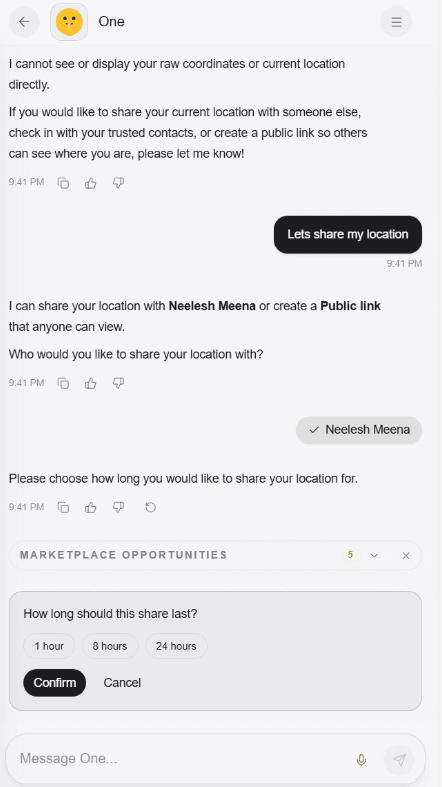
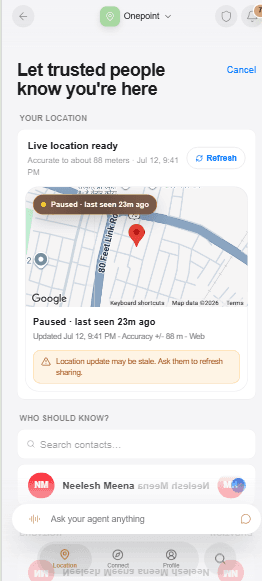
An advisor is preparing for a scheduled meeting. The client is driving in from another part of the city, and both people would rather avoid a chain of "Where are you?" messages.
The advisor does not need the client's location by default. The useful action is narrower: request a one-hour arrival window, explain that it is for the meeting, and let the client approve, decline, or ignore it.
With One Location Assistant, the advisor can begin with intent: "Ask my client to share their location for our meeting." The Assistant turns that sentence into a reviewable workflow. It gathers what is missing, but it does not turn conversation into silent access.
The experience should feel faster without becoming less legible. The person can see the prepared action, understand its audience, and change course before anything sensitive happens.
The old experience is a pile of small decisions
Traditional location sharing assumes the user already knows which screen, button, contact, duration, and privacy setting to use. That is manageable for one familiar flow. It becomes tedious when the person wants to stop one recipient, ask another person, explain a reason, or create a temporary link for someone outside the app.
An AI location sharing assistant can reduce those taps by starting from the job. The important standard is not whether it can interpret a sentence. The important standard is whether it preserves the product's consent boundaries after interpreting it.
One Location Assistant does this through a verified set of prompts:
- Who can see me? checks current sharing state.
- Stop sharing with... asks which person if the name is missing or ambiguous.
- Ask someone to share prepares an access request.
- Deny a request targets the latest relevant request and keeps the decision explicit.
- Share my location with... gathers recipient and duration before preparing the share.
- Show me where someone is works only when an active grant allows the view.
- Make a public link prepares the separate public-link workflow and its review.
These are not generic chat suggestions. They are recognizable location jobs connected to real product tools and the current consent state.
The Assistant asks for what the sentence leaves out
"Share my location with Jordan" sounds complete, but a safe workflow still needs to know which Jordan, how long the share should last, whether the owner wants approximate or precise location, and whether an optional note would help.
The Assistant can disambiguate a person from the location-ready directory, ask for a duration, and present a final action card. For a request, it can gather the person, duration, reason, and message. For a public link, it can explain that the link has a different audience and privacy model than a private recipient share.
The Assistant carries the conversation into a prepared action while the person still chooses the recipient and duration.
This is where agentic location sharing earns trust. The agent is useful because it carries state across the steps, not because it skips them.
What happens in the advisor story
The advisor asks: "Ask Maya to share her location for our 3 p.m. meeting."
If more than one Maya is available, the Assistant asks which one. It proposes a duration and reason, then shows the request details. The advisor reviews the person, one-hour window, meeting context, and message before sending the request.
Maya receives a request, not a grant. She can approve it, decline it, or leave it unanswered. If she approves, her private share is created for the selected recipient and duration. If she declines or ignores it, the advisor receives no location. That is the entire point of "No silent tracking": the agent can coordinate the ask, but the other person remains the decision-maker.
The request also avoids a common social problem. A bare location request can feel invasive because it arrives without context. "For our meeting, for one hour" is easier to evaluate than an unexplained demand.
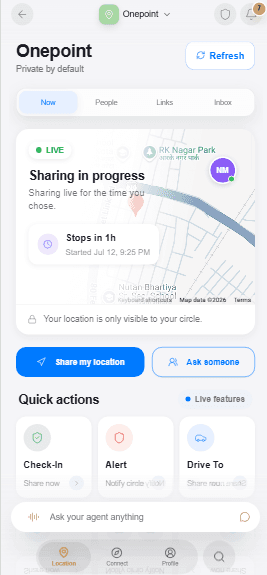
Onepoint keeps the current share and the Assistant entry point together on the home screen.
"Who can see me?" is a control question
One of the strongest prompts is also the shortest: Who can see me?
The answer should come from active grant state, not from a model guessing based on conversation history. The Assistant can summarize current recipients and expiries, or state that no active private shares exist. It does not need to show the user's raw coordinates to answer the question.
That distinction matters. The Assistant coordinates permission and location workflows, but it does not receive the owner's private coordinates or private decryption key. Coordinate capture and private recipient encryption happen on the owner's device. Decryption happens on the approved recipient's device. The agent works with people, durations, scopes, confirmations, and grant state.
The same rule protects Show me where someone is. The command is useful only when that person has granted active access to the requester. Without the grant, the right answer is not a map; it is that access is unavailable.
Confirmation is part of the automation
It is tempting to treat confirmation as a failure of automation. For sensitive actions, confirmation is part of the product.
Stopping a share, sending a request, creating a private grant, denying a request, or making a public link changes another person's access or expectations. The Assistant can prepare the action, but the review screen gives the owner a chance to catch the wrong recipient, duration, location type, or audience.
This is especially important for public links. A private share is client-encrypted and recipient-bound. A public location link is explicit, expiring, and revocable, but anyone with the active link can view the snapshot the owner attached. The Assistant must not describe the public link as a private end-to-end encrypted recipient share.
Chat and touch remain equal paths
One Location Assistant does not replace Now, People, Links, or Inbox. It gives users another way into the same product state.
Someone who prefers touch can open Share, choose a person, set the duration, and review. Someone who thinks in sentences can say, "Share with Jordan for 30 minutes," then review the prepared action. Both paths should produce the same recipient-bound grant, expiry, revocation controls, and consent receipt.
This matters for accessibility and speed. It also prevents the chat layer from becoming a second, less-governed product. The Assistant is a coordinator over the consent system, not an exception to it.
Frequently asked questions
Can the Assistant see my raw live coordinates?
No. The Assistant coordinates workflow state such as recipients, requests, durations, and confirmations. Private coordinate capture and encryption stay on the owner's device.
Can the Assistant share without asking me to confirm?
Sensitive actions are prepared for review. A share or public link should not become active merely because a model interpreted a sentence.
What if two contacts have the same name?
The Assistant should disambiguate the person using the available location-ready directory and relationship context before preparing an action.
Can someone ignore a request?
Yes. The recipient may approve, decline, or ignore a request. A request never grants location access on its own.
The best automation removes coordination work while preserving human agency. That is the direction behind One Location Assistant and the broader consent-first agent stack: the agent can do more because the boundary is clear, not because the boundary disappeared.
Product references
The 🤫 hussh magazine
Written by hussh Team, and built to read beautifully here — and to travel to 🤫 One on your phone, your glasses, and visionOS, as one immersive magazine you own.