Introducing One Location Agent: Consent-First Location Sharing Inside Hussh One
Meet One Location Agent, a consent-first way to share live location with a person, purpose, duration, expiry, and clear control inside Hussh One.
A founder is flying in for an office visit. The team knows the meeting time, but the useful question is more ordinary: when should someone head downstairs to meet her?
She does not need to join a permanent family map. She does not need to give the whole company an open-ended view of where she goes next. She needs to share one arrival window with one colleague for one hour. When the hour ends, the access should end with it.
That is the job One Location Agent is built to handle inside the Hussh One app: private live location sharing that starts with a person, a purpose, and a boundary.
Start with Now, not with a map full of people
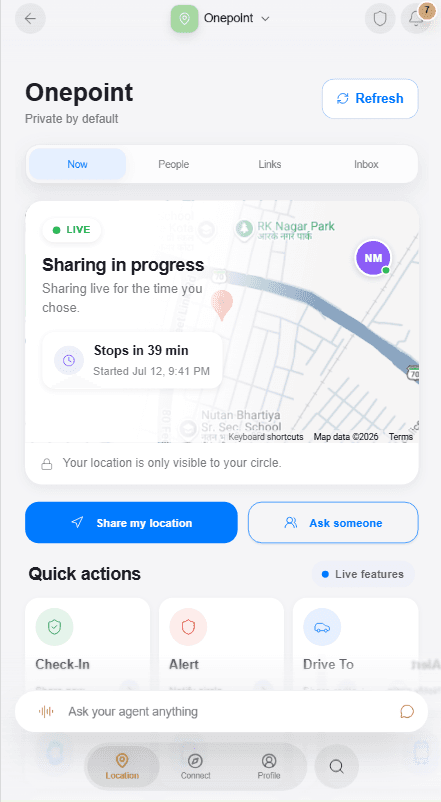
The Now tab answers the questions that matter before you share anything. Is location ready on this device? Is a share currently active? Who can see it? When does it stop? Can you revoke it now?
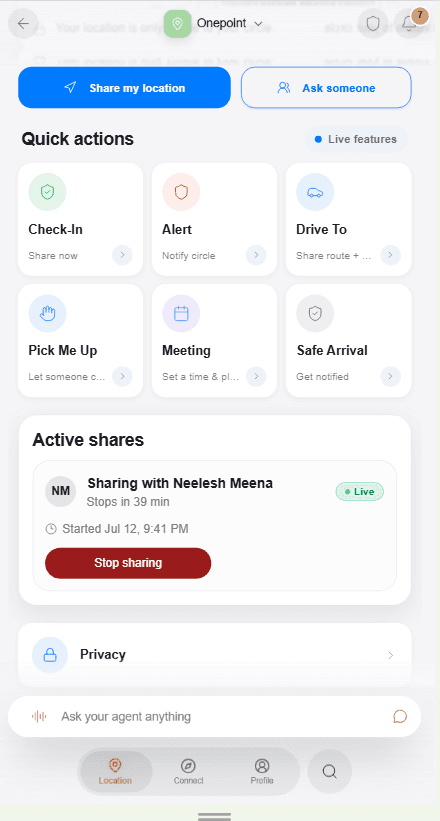
The screen keeps the primary actions direct: Share my location when you want to send access, and Ask someone when you need another person to share with you. Active shares sit below with a visible countdown and a Stop sharing control. Privacy is a first-class destination, not a sentence hidden in settings.
This is controlled location sharing in practical terms. You should not need to remember that a switch is still on. The interface keeps duration and current access visible while the share is alive.
A share is a small consent contract
Tap Share and the flow slows down in the right places. First, choose a location-ready recipient. Then choose the location type, set a duration, and add an optional note such as "On my way to the meeting." Before anything starts, a final review states who can see the location, whether it is approximate or precise, how long access lasts, and how to stop it.
The live screen keeps the recipient context, expiry, map, and stop controls visible while sharing is active.
That final screen is not ceremonial. It is the difference between tapping a convenient button and understanding the permission you are about to create. Private recipient shares are bound to the selected person. The owner's device encrypts the location for that recipient, and the approved recipient decrypts it on their own device. The service coordinates encrypted envelopes and grant state; it is not supposed to inspect a private coordinate or keep a readable movement trail.
Expiry and revocation are enforced before a recipient can read another update. If the hour ends, access ends. If the owner taps Stop sharing earlier, access ends earlier. The current version is foreground-only, so it does not claim universal background tracking.
People are relationships, not permissions
The People tab brings together a Trusted Circle, location-ready people, invites, and people with relevant sharing history. It helps you find the right person without treating every contact as equally close.
Trusted Circle membership does not automatically grant location access. A circle can express a relationship; the live-location grant is still explicit and per recipient. This matters for mixed personal and professional networks. A spouse, a co-founder, an investor, and a driver may all be trusted in different ways, but they should not inherit the same location permission.
The Links tab handles a different case. An owner can create an explicit, expiring, revocable public location link for someone outside One. A public link may expose the snapshot the owner intentionally attached to it to anyone holding the active link. It is useful for a temporary handoff, but it is not the same thing as a client-encrypted private recipient share and should never be described that way.
Inbox completes the loop with incoming requests, locations shared with you, and receipts. Requests can be approved or declined. Shared locations disappear when their access expires. Receipts make a location decision visible after the tap, which is the same consent principle behind the broader Consent Center.
Share, Ask, and the quick actions around real life
One Location is more than a generic blue dot. Its quick actions frame common coordination jobs in language people already use:
- Check-In shares now with selected trusted people for a chosen duration.
- Alert opens the SOS-ready flow so the user can deliberately notify ready trusted contacts with live location. It does not promise emergency-service dispatch or guaranteed delivery.
- Drive To shares a route context and ETA with selected people. It is coordination, not turn-by-turn navigation.
- Pick Me Up sends a pickup request and shares the user's live location with the selected trusted person for the chosen window.
- Safe Arrival shares a journey and ETA so chosen people can follow along. It does not claim automatic arrival detection.
- Meeting is visible as coming soon and is not presented as a live feature.
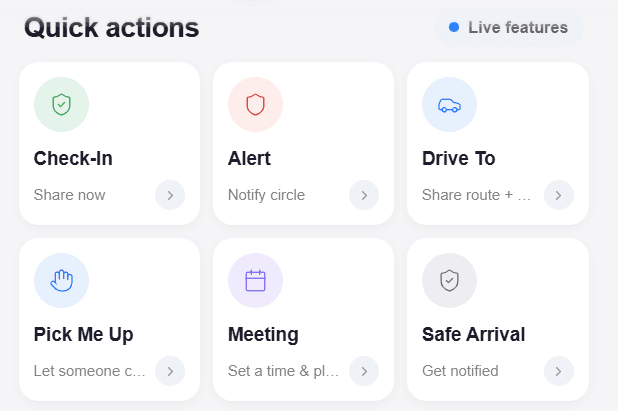
Check-In, Alert, Drive To, Pick Me Up, and Safe Arrival are live action frames. Meeting remains coming soon.
These actions reduce interpretation. "Pick me up" is clearer than building the same workflow from a generic location toggle, a message thread, and a phone call.
Ask without creating silent tracking
Ask reverses the direction. You choose a person, duration, reason, and optional message, then send a request. The other person decides whether to approve, decline, or ignore it. No request becomes access by itself.
The product makes that boundary explicit with the phrase No silent tracking. A request can explain that an advisor is waiting for a meeting, a family member wants a late-night check-in, or a colleague needs an arrival window. Context helps the recipient make a comfortable decision, but it does not weaken their choice.
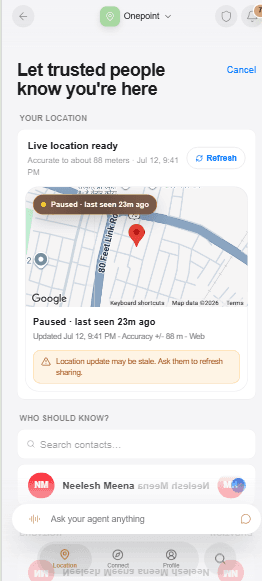
Recipient selection stays grounded in the person and the latest location state. The recipient still approves before access begins.
A one-hour office arrival, end to end
Return to the founder arriving at the office. She opens One Location, selects the colleague meeting her downstairs, chooses precise live location for one hour, and adds a note: "Landing now. Meet me in the lobby."
The consent review shows exactly what will happen. She confirms. Her colleague can follow the arrival during the active window. The founder can stop the share at any moment, and it expires automatically after the chosen hour. There is no permanent office circle to clean up later.
The useful outcome is simple: less coordination overhead, less ambiguity, and less access left behind.
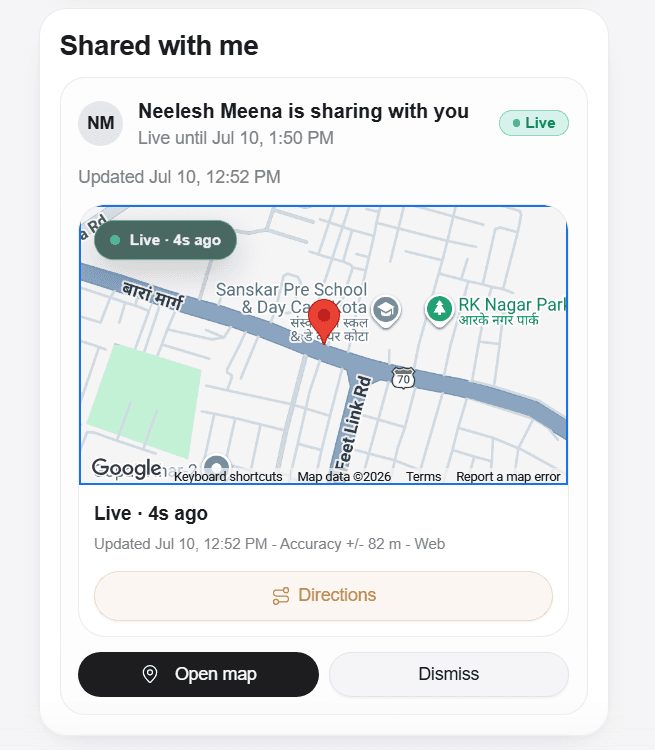
The recipient sees the active share, freshness, accuracy, map, and clear dismiss controls.
Frequently asked questions
Does Trusted Circle mean everyone in the circle can see me?
No. Trusted Circle helps organize relationships and discovery. Live location still requires an explicit grant to each selected recipient.
Can I stop a share before its timer ends?
Yes. Active shares include a Stop sharing control. Expiry also ends access automatically when the selected duration is over.
Are public links end-to-end encrypted private shares?
No. Private recipient shares are encrypted for a selected recipient. A public link is an explicit, expiring, revocable snapshot-sharing link available to anyone who holds the active link.
Does SOS call emergency services?
No. The Alert flow is designed to notify ready trusted contacts with live location after a deliberate action. It does not claim emergency dispatch.
One Location is a small but important shift: location is not a permanent social setting. It is a permission for a real moment. Read more about the principle in Your Information Is Your Business, then open One and share only what the moment needs.
Product references
The 🤫 hussh magazine
Written by hussh Team, and built to read beautifully here — and to travel to 🤫 One on your phone, your glasses, and visionOS, as one immersive magazine you own.